

Search and AI News You Can Use (Marie's Newsletter)
In this episode I’m going to share the top five things I’ve been discussing with clients this week. I’m finding that playing around with some of these new capabilities of Gemini, in particular Gemini in Chrome has given me a bit of an existential crisis! The web is changing so quickly, and many of the things we've spent years building might soon be obliterated as AI advances. But there is also so much opportunity if we can figure out where to focus.
Note: Newsletter has changed again! I’ve written more at the end of this article on why I’ve changed my newsletter approach and moved it out of my community and back on to my blog.
If you want to get the Cliff’s Notes version of future episodes of this newsletter sent to you by email as I publish, sign up here:
Here are the five topics I’ve discussed the most in my recent client calls.
1. The Evolution of Search into an "Agentic Manager"
Search is changing from a place where we passively look for information to an "agentic manager" where we actually get things done. Sundar Pichai said in an interview, “a lot of what are just information-seeking queries will be agentic in Search.” And head of Search Liz Reid acknowledged that humans will still use the web, but much of the web will simply involve agents talking to each other.
If you’ve seen your clicks from Search dropping over the last couple of years, it’s not likely that you’re doing things wrong in terms of SEO. Search is heading in a different direction and AI Overviews and AI Mode are directly answering the questions to almost any informational need. On my phone, if I expand an AI Overview, traditional search completely disappears and I am in the AI Mode infrastructure, with AI answering my questions and websites are there if I need them. Some people are seeing this happen on desktop searches as well. Google has just announced that now when you click on a link in AI Mode it will open the website in a panel next to your AI Mode conversation.
As I write this, Google released a new tool for Windows that allows you to hit Alt+Space and open up a Search bar that you can use to search across your files, Google Drive, apps and more. Searches open in AI Mode which means that many of the things we used to go to websites for will simply be answered by AI. Oh, and also there is now a similar app for Mac users. I just hit option-space and Gemini pops up over whatever I'm doing. I can start a conversation there and I can continue it in the sidebar as I'm browsing Chrome.
As we’ll discuss below, Chrome is becoming a place where we can do things with Gemini - not just get information.
The purpose of Search is changing. It is shifting from a place where we go to get information to one where we have our agents get things done for us.
Yesterday I published a post on how I’ve been really thinking about what the purpose of a blog is in this new age of agentic search. I don’t think the blog dies, but I think our motivations for writing content are different now.
2. Gemini in Chrome will change how people Search
The second thing I’m emphasizing is how deeply AI is integrating into our daily workflows. I finally got access to Gemini directly within Chrome, and I cannot believe how much I'm using it to converse across my open tabs and Google Docs. It’s hard to imagine how I did work before without it!
Did you know you can have multiple tabs open and converse with Gemini about them? Like I can say, “Look at my GSC data for this page and also my page itself and tell me what questions my audience is asking about that I don't cover well:sea

Seeing this made me excited but also sad because I realized that much of what I have spent months building into my personal SEO tools dashboard with multiple hand coded agents can be much better accomplished with prompts in Gemini in Chrome. And then this week Google released skills in Chrome which will let us re-use and modify prompts. Now, instead of me a prompt like I did in the image above, I can save it as a skill and use it on any page on my site I want to improve. It’s not hard to imagine that eventually browser use capabilities or WebMCP will be used here and I’ll be able to create skills that not only make the suggestions for me, but do agentic things like open up my WordPress dashboard and make the suggested edits as well.
Join Marie's Search Bar Community
Be the first to know what's happening in Search & AI.
Free Member
Get the lastest info as it happens in the SEO & AI News feed.
Search Bar Pro
Tips, Prompts and Strategies for AI & Search from Marie, discussion and Q&A and weekly Search Bar Pro calls.
3. Antigravity is amazing
You possibly have tried Claude Code or Cowork. These tools are incredible, but in my hands, Antigravity is better. I think it is good to get familiar with several of these tools. I personally used ChatGPT Codex for as much as I could for a week and then did the same with Claude Cowork. But eventually I found myself going back to Google’s Antigravity.
Antigravity is not a coding tool. I mean it is. But its power comes in using the Agent Manager. I’ve been working for months with Claude code to build an app to monitor my plants but never quite got it to the point where I was able to truly use it. On Sunday I opened up Antigravity and rambled on about what I wanted to build. I used my favourite prompt at the end, “Ask me questions one at a time so you understand what I want to build.”

Antigravity asked if I wanted a feed for each of my plant types. What a good idea. It took me about an hour from the first prototype to a functioning project with a Supabase database and deployed on Netlify and it works amazingly well.

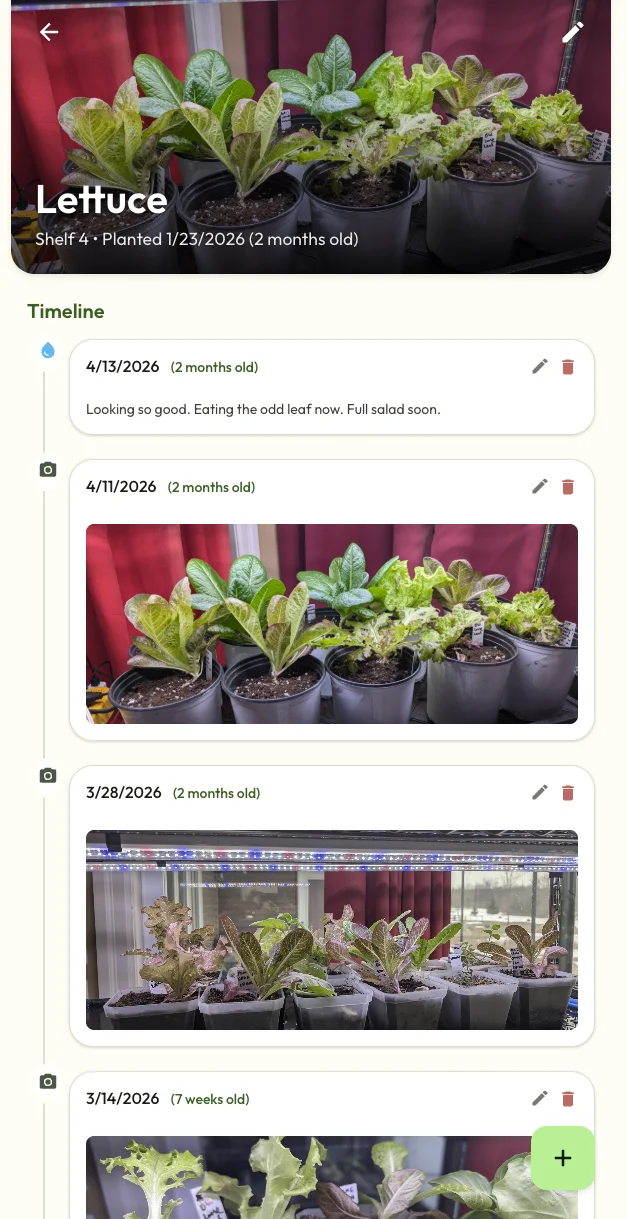
Even if you think Claude Code/Cowork is the most amazing thing ever (you are not wrong), I’d encourage you to really dedicate a week to trying to use Antigravity in your workflows. I can see its functionality perhaps being a part of Gemini in Chrome, the Gemini app and even AI Mode. Sundar Pichai said that the teams at Google use it. Google engineer Jaana Dogan says that everyone she works with uses Antigravity “like every second of the day”. Sundar said the team working on Search just started using it last week. For some reason they call it “Jet Ski” internally. (More here on my summary of Sundar Pichai’s latest interview where he talks about the future of Search.)
4. UCP and WebMCP - those who jump first could have an advantage
I’ve been talking a lot about UCP (Universal Commerce Protocol) lately. Here’s my latest chat about this with Andrea Li:

And here is another video from me with loads more information on UCP. If you work with eCommerce, it’s mandatory to be on top of this protocol as it evolves. This week Google released new documentation on UCP which is something every dev team involved with eCommerce needs to read. You also should read this information on implementing UCP via Merchant Center. There’s a link there to join the UCP waitlist.
The other thing that all of my clients are talking about is WebMCP. WebMCP lets agents interact with the tools and functionality on your website. Again, it’s not hard to see that Gemini in Chrome will eventually be able to recognize when a page you are on has WebMCP capabilities. I’d encourage you to sign up for an early preview of WebMCP. Google will send you documentation on implementation and testing.
On a call with one of my clients this week we asked Gemini to predict when people will start using WebMCP. Now, keeping in mind that AI isn’t always the best at future predictions, but if correct, these predictions are wild! Gemini said that by late 2026 we will start seeing some websites using it and by 2027 it will be commonplace. Gemini also predicted that if my client implemented WebMCP functionality before their competitors did, they may have an advantage because agents will be more likely to recommend and interact with pages that have web tools they can use via MCP without having to use the page as a browser agent and clicking on pixels like humans do.
5. The way we create and modify websites is changing
The way we manage our websites is about to be turned upside down. Cloudflare released a product called EmDash, calling it the spiritual successor to WordPress. At first I thought it was an April fools’ joke, but it definitely is real. EmDash is AI Native, having agent skills and also a CLI (command line interface.)
Shopify also blew me away with their Shopify AI toolkit. You can use this with Claude Code, ChatGPT Codex, VS Code, Cursor or the Gemini CLI. In their demo they showed a user using Claude Code in the terminal and simply saying, “Optimize my products for SEO,” and Claude went off and rewrote title tags and more.
the Shopify AI Toolkit is here
manage your store with your favorite agent
Claude Code, Codex, Cursor, VS Code, and more pic.twitter.com/gmQiRTdA8p
— Shopify (@Shopify) April 9, 2026
I know. I know. There is so much potential for things to go bad here. But also, there is huge potential for people using agentic tools to have a massive advantage.
Have you heard of Andrej Karpathy’s autoresearch? It’s a simple system that uses agents to run experiments and improve their own algorithms. It’s not hard to see that we will eventually have a system of agents that not only optimizes our websites (for content, speed, agentic preparedness and more) but continually tests and learns and improves.
This type of agentic self improvement is even more mind bending when we think of the powerful AI models that are coming. Anthropic released a model called Mythos that is significantly more powerful than their current Opus 4.6 Opus 4.7 (damn things are moving fast) model. Although Mythos wasn’t designed for cybersecurity, they found it was able to find vulnerabilities in pretty much every piece of software that exists. Now think of what this means when we have recursive self improvement.
We are very rapidly approaching an age where AI will be smarter and more capable at any cognitive task a human can currently do.
In Sundar Pichai’s interview he was asked how long it will be before businesses comfortably have fully agentic processes where no human is necessary. He said we’ll continue to be in the loop for a while, but he expects that 2027 will be “an important inflection point” and “a big year in which some of those shifts happen pretty profoundly.”
About my newsletter changes
I’m experimenting more with how I produce my newsletter. In my 14 or so years of writing it, it’s gone through several new seasons!
You may have noticed that I brought the newsletter back to my blog and out of my community. As I mentioned in my post on what the purpose of a blog is our purpose in writing changes as the web shifts to become agentic. I want my blog to be a place where you can use it to do things with your agents. The blog does much better in Search as, as much as I love my community host Mighty Networks, there are SEO issues with it that are beyond my control.
So, let’s return again to “Search News You Can Use!”
Ideas for using this page agentically
So, with that in mind, here are some ideas on what you could do with your agent with this blog post. If you're reading this on desktop, I’d encourage you to open up Gemini in Chrome in the sidebar. (If you have it you’ll see an “Ask Gemini" button at the top right of your screen.) I should mention that Gemini Pro often tends to do better than the free versions of Gemini, so if you're disappointed, it may be worth upgrading to a paid plan to test it out.
Try versions of these prompts:
1. Brainstorm on how WebMCP could be used on your site.
Open up the Gemini in Chrome sidebar on this page you’re currently on. Then open a new tab for your homepage and also this github repo for webmcp. Then, use the plus sign to add all three tabs to your Gemini in Chrome conversation and enter this prompt:
I am interested in understanding more about WebMCP. Briefly explain it, then look at my website as well as the github repo and give me 5 practical ways that I might use WebMCP for my website.
2. Customize my newsletter for your clients
Assuming you have client documentation in Google Drive and have Google Meet transcripts, try this. (If you don’t use Drive and Meet, you can try this by opening up your client’s website in another tab and adding it.)
Find my client conversations and past few reports for [client/brand name] and use it to make a short newsletter that covers the topics here that are relevant to them. Be sure to include hyperlinks to the urls they would be interested in reading that are related to each topic.
Note, if it doesn’t sound like you, but more like AI, try playing with Gemini to ask how you can customize it by looking at your past conversations. Then turn this into a skill.
3. Start thinking about autoresearch
I can’t stop thinking about Andrej Karpathy’s autoresearch. I’ve seen YouTube videos talk about using it to improve your marketing. For example, you could give it a goal of maximizing newsletter signups and set it off to create new copy for your signup page and continually iterate and improve.
Find a few Youtube articles from this search on Karpathy’s autoresearch and add the tab for that video to your current Gemini in Chrome conversation. Also add this tab for the autoresearch github and your homepage.
I am very interested in Andrej Karpathy’s autoresearch. Help me brainstorm how I could use it in my business.
You can then take the ideas Gemini gives you and head on over to Antigravity and say to the agent manager, “How do we build this? Here’s the github repo we want to use.”
Prefer video? Here are a bunch of my thoughts on Search becoming an agent manager

Sign up for the newsletter
If you want to be notified by email each time I publish a future newsletter like this, you can sign up here:
Or, join us in the Search Bar for up to the minute news on Search and AI. Or better yet, join my paid community where we have regular calls to brainstorm on using AI and I share tips and ideas as well.
btw...Antigravity helped me make code snippets to dynamically insert the best Search Bar conversations into my blog posts. 🦾
Leave a comment
Gulp. I am opening up my comments section. I closed it because of spam and mean people. Now I’ve got a system I built with AntiGravity that filters out comments that are clearly meant to be hurtful, which means I won’t see them and only see the ones from you amazing people who are learning to use AI just like me.
If you enjoyed this new format, please share your thoughts in the comment section!

Leave a Reply